
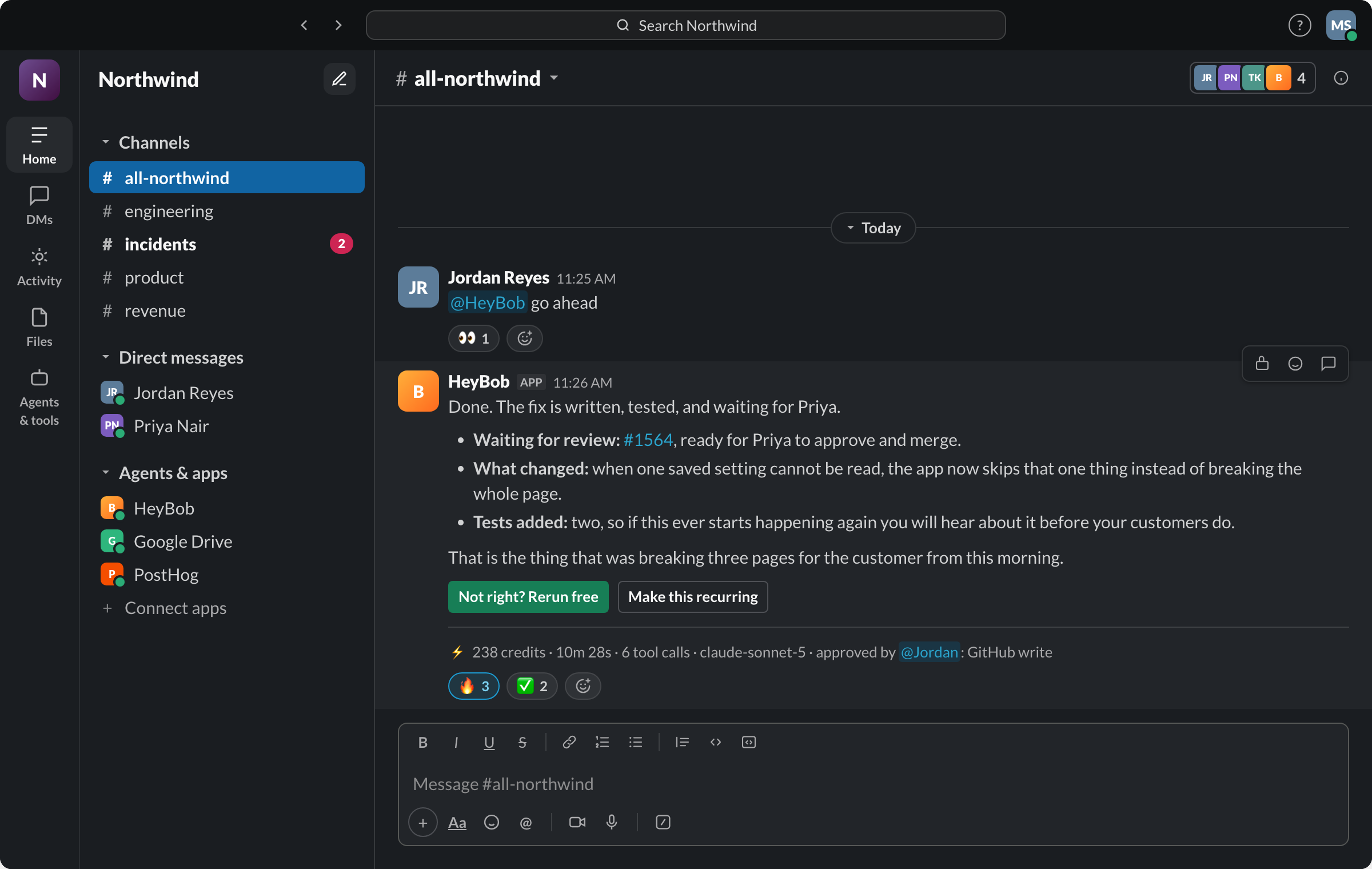
- Both put an AI employee in your team chat that finishes work, not one that drafts suggestions. Viktor lists 9,800+ tools and Bob connects to 3,200+ apps, so both reach the everyday tools a small team runs on; check yours on each list.
- Credits now compare directly. A Bob credit and a Viktor credit are about the same size. Bob’s $75 buys 40,000 and Viktor’s $50 buys 20,000, so Bob costs roughly 25% less per credit. What one job costs depends on the job and the model, and Bob posts the exact figure on every one. New Bob plans are also half price through December 31, 2026.
- Viktor is live in Slack and Microsoft Teams, says 76,000+ teams use it, and starts at $50 a month.
- Bob posts a receipt with every finished job, stops at a hard monthly limit you set on any plan, and redoes his own mistakes for free.
- If your last AI bill surprised you, the rows that matter below are price per credit, the spending limit, and free redos.
What Viktor is
Viktor calls itself “the AI employee that does the work, in Slack & Teams.” It says 76,000+ teams use it and that it connects to 9,800+ tools. It added a marketplace of ready-made skills in April 2026 and a version for media buyers in March 2026, and went generally available in Microsoft Teams on June 18, 2026. It is rated 4.9 out of 5 on Product Hunt. Plans start at $50 a month for 20,000 credits, and new workspaces get $100 in credits.
What Bob is
Bob is an AI employee for Slack, or for the HeyBob app on Mac, Windows and Linux if your team isn’t on Slack. You hand him the work that eats your week, the report, the triage, the number someone keeps asking for, and he does it across the 3,200+ apps your team already uses. When you are talking to him, he asks before he changes anything in your tools. Scheduled jobs run on their own and report back when they finish. Either way, every finished job posts a receipt with what it cost. He also takes meeting notes from the Mac or Windows app with no bot in the call, then does the follow-ups.
Credits now line up. Compare them directly.
A Bob credit and a Viktor credit are now about the same size, so the numbers mean the same thing. Viktor’s $50 buys 20,000 credits, a quarter of a cent each. Bob’s $75 buys 40,000, a little under a fifth of a cent each. That is roughly 25% less per credit, and Bob’s rate drops further on bigger plans. Even Bob’s top-up packs, $40 for 20,000 credits, work out to a fifth of a cent a credit, below Viktor’s plan rate.
What one job costs depends on the job and on the model doing it. A short question can take a few dozen credits and a long build several thousand, so a price list by type of job is a guess on either side. Bob doesn’t make you guess: you pick the model, every finished job posts its exact cost, and he stops at the monthly limit you set.
Viktor prices read from viktor.com/pricing on October 30, 2026. Bob figures use the $75 plan at full price; the end-of-year offer halves it for new plans through December 31, 2026.
What Viktor’s happy customers still ask for
Viktor’s reviews are warm. Even so, the same few wishes come up among people who like it:
No surprise bills from automations
Reviewers ask for tighter control over when automations run, so scheduled work doesn’t eat credits they didn’t expect to spend.
Bob: every finished job posts its cost, scheduled ones included, and a hard monthly limit you set means he stops rather than overspends. He warns you in the channel when you get close.
Credits back when a job goes wrong
Reviewers ask for a way to get credits back for runs that errored.
Bob: if a job is wrong because of Bob, press Not right? Rerun free and he does it again on us. You never pay for his mistakes.
Knowing when and why it acted
Reviewers say clearer insight into when and why it takes an action would make it easier to trust.
Bob: when you are talking to him, he asks before he changes anything in your tools. Scheduled jobs run on their own, then post what they did and what it cost in the channel.
Paraphrased from reviews on Viktor’s Product Hunt page, read October 30, 2026.
Side by side
Which one should you pick?
Pick Viktor if…
- Your team lives in Microsoft Teams or Discord and needs it working there today.
- You want trial credits with no deadline.
- You want a large marketplace of ready-made skills.
Pick Bob if…
- You want to see what every job cost, in the channel, the moment it finishes.
- You want a hard monthly limit and a cap per person on every plan, not only on Enterprise.
- You don’t want to pay for the AI’s mistakes.
- You want meeting notes with no bot in the call, and the follow-ups done for you.
- You’d rather onboard with the founder than a queue.
Either way: an AI employee in your channel beats a chatbot in a tab. The category is right; pick the one whose bill you can live with.
Switching is on us.
Early customers switching from another AI-employee platform get the credits remaining on their existing commitment matched, and Bob does the move himself during onboarding: he reads your recurring tasks and rebuilds them in your workspace.
Fair questions
Is Bob a good Viktor alternative?
Yes. Both finish work from Slack and connect to thousands of apps: Bob to 3,200+, Viktor lists 9,800+. Viktor is live in Microsoft Teams today; Bob is not in Microsoft Teams today. Bob is the stronger fit when you want to see what every job cost, a hard monthly spending limit on any plan, and a free redo when Bob gets a job wrong.
Can I compare Bob credits with Viktor credits?
Yes. A Bob credit and a Viktor credit are now about the same size, so you can compare them directly. Viktor charges $50 a month for 20,000 credits, $2.50 per 1,000. Bob charges $75 a month for 40,000, about $1.88 per 1,000, so roughly 25% less per credit. What one job costs depends on the job and the model doing it, and Bob posts the exact cost on every finished job. New Bob plans are half price through December 31, 2026.
How is Bob’s pricing different from Viktor’s?
Viktor starts at $50 a month for 20,000 credits, and $100 buys 40,000. Bob starts at $75 a month per workspace for 40,000 credits, about 25% less per credit, and new plans are half price through December 31, 2026. Neither charges per seat. Bob adds a receipt on every finished job, a hard monthly spending limit on every plan, and free redos on Bob’s mistakes. Enterprise pricing is custom at both.
Can I switch from Viktor to Bob?
Yes. For early customers switching from another AI-employee platform, we match the credits remaining on your existing commitment, and Bob rebuilds your recurring tasks himself during onboarding.
Does Bob support Microsoft Teams like Viktor does?
Not yet to the same degree. Viktor has been generally available in Microsoft Teams since June 18, 2026. Bob is not in Microsoft Teams today; he works in Slack and in the HeyBob app on Mac, Windows and Linux.
Do Bob’s credits expire?
Unused plan credits roll over one month, then expire. Top-up packs are $40 for 20,000 credits and never expire. The free trial is 50,000 credits, about $100 of work, to use within 14 days.
Viktor is a trademark of its respective owner. HeyBob and Bob are products of Tiny Cloud Ventures, which is not affiliated with, sponsored by, or endorsed by Viktor. This comparison is provided for informational purposes; details rechecked October 30, 2026 against Viktor’s public site and Product Hunt page.